WMS Scanning Simulator
Here, you can find information on WMS Scanning Simulator – a simple but valuable tool that can imitate CompuTec WMS behavior on scanning barcodes. It can be beneficial during the CompuTec WMS testing period.
Download
Unzip the file and run it (it does not require installation).
Usage
-
The simulator can be run through a remote desktop, but only one user at a time can do this (unlike CompuTec WMS, which can be used by many users simultaneously).
-
The simulator can operate on one of the barcode standards supported by CompuTec WMS: GS1, Odette. Click here to find out more.
-
You can scan an Item by its name or barcode.
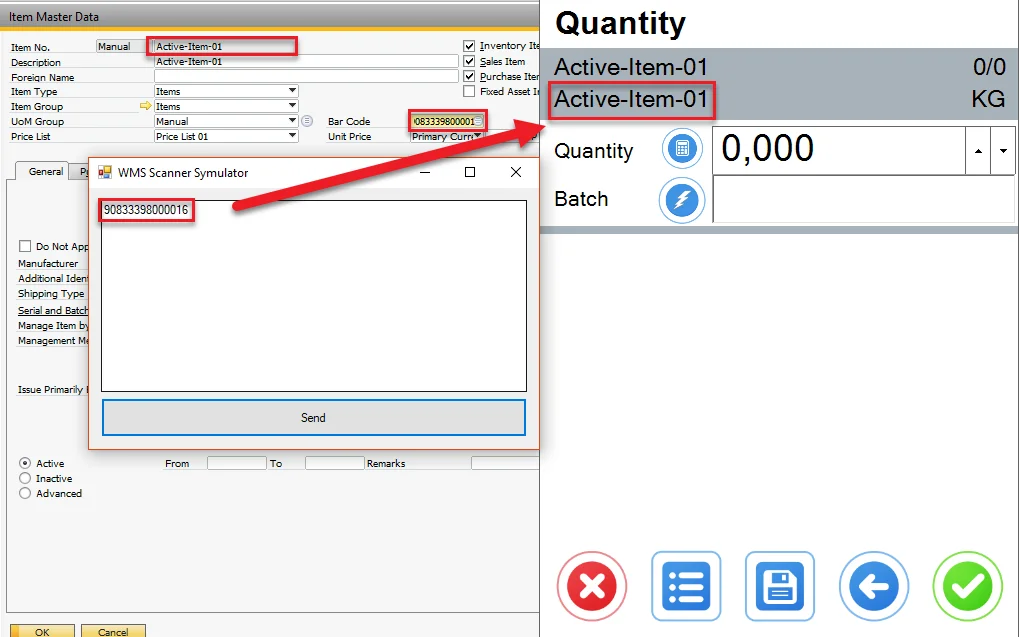
-
You can scan a single code or use a multi-part barcode by putting each code in a separate line:

VIDEO