Dispatch Control
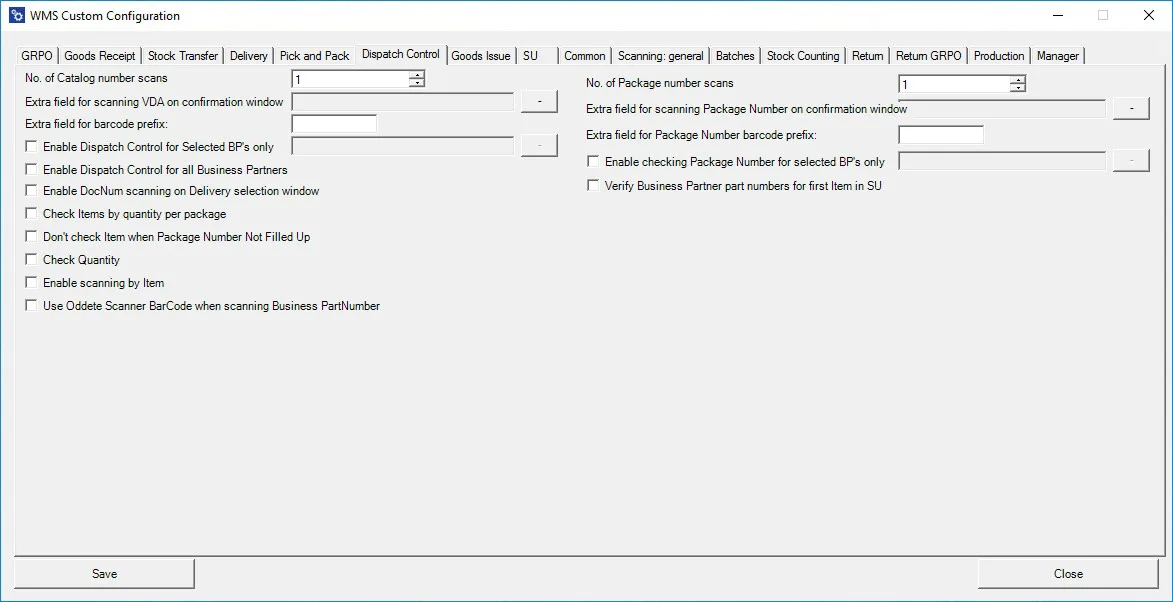
No. of Catalog numbers scans – defines a number of scanning of Catalogue numbers, after which the application goes another step.
Extra field for scanning VDA on confirmation window – allows defining a user-defined field.
Extra Field for barcode prefix – this option allows to definition a prefix. Scanning a barcode with this prefix allows one to move to another step in the transaction.
Enable Dispatch Control for Selected BPs only – this option allows the definition of Dispatch Control only for some previously selected Business Partners.
Enable Dispatch Control for all Business Partners – allows defining Dispatch Control for every Business Partner.
Enable DocNum scanning on the Delivery selection window – allows scanning by document number (by content, if the checkbox is unchecked)
Check Items by quantity per package – allows to check Items by quantity by packaging, e.g., if there are four packages, 25 pieces each, a user will not be able to scan 100 parts, but to scan 25 pieces four times.
Don't check Item when Package Number Not Filled Up – when this checkbox is checked, a row is not checked if a number of packaging is incomplete.
Check Quantity – checks quantity by scanning a barcode. Moving to another step is impossible if the correct quantity is not scanned. If a user makes a mistake, they must click the x button and start counting again. Putting the amount manually is impossible; it works only by scanning.
Enable scanning by Item – allows to scan by Item (applicable if Batches do not manage an Item)
Use Oddete Scanner BarCode when scanning Business PartNumber – allows adjusting Batch number scanning if Business Partner is using Odette standard.
No. of Package numbers scans – defines several scanning of Catalog numbers, after which the application goes another step.
Extra field for scanning Package Number on confirmation window – allows defining a user-defined field on the final form of the transaction.
Extra field for Package Number barcode prefix – this option allows to define of a prefix
Enable checking Package Number for selected BP's only – this option allows to check Package Number only for some chosen previously Business Partners
Verify Business Partner part numbers for the first Item in SU – this option allows you to check U_PackageNumber and Business Partner number only for the first item in SU