Goods Receipt
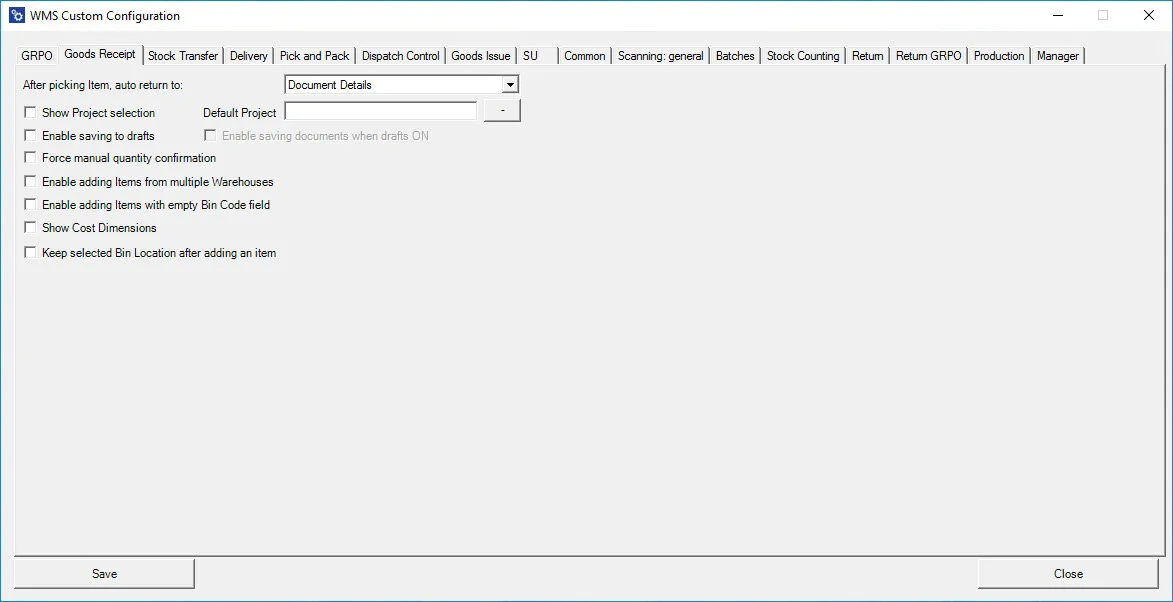
After picking an Item, auto return to – the option allows you to choose to which window the application goes after picking an Item.
Show Project selection – choosing this option results in displaying the Project Selection form before the Remarks form when creating a document (to which it is required to add receiving Items).
Default Project – if a default project is chosen, clicking the right arrow icon on the Project selection form is possible. A default project set up here will be chosen automatically.
Enable saving to drafts – allows saving documents as document drafts.
Enable saving documents when drafts ON – allows deciding on the Remarks form whether to save a transaction as a document or a document draft.
Force manual quantity confirmation – with this option checked, it is required to manually confirm previously set up quantity (scanning a barcode does not confirm it automatically)
Enable adding Items from multiple Warehouses – if the option is checked, adding Items from different Warehouses is possible, and the Warehouse window will be displayed during the transaction.
Enable adding Items with empty Bin Code field – it allows to add Items without Bin Code to a Warehouse with Bin Locations. An Item with an empty Bin Code will be assigned to the first available bin if enabled.
Show Cost Dimensions – checking this checkbox adds a button (next to the Back button) on the Quantity form that leads to the Cost Dimensions form.
Keep selected Bin Location after adding an item – after picking an Item, the Bin Location field will not be cleared (keeping the same Bin Location).